



1. Introduction
In the fast-paced world of financial services, efficiency and accuracy are not just advantages—they are necessities. For financial brokers handling multiple client opportunities daily, managing large volumes of documents can quickly become overwhelming, especially when processes are manual.
In this blog, we explore how we transformed a traditional, manual document management process into an intelligent, automated system using Microsoft Syntex and Power Automate, significantly improving productivity, accuracy, and scalability.
2. The Challenge: Manual and Time-Consuming Processes
Our Australian client, a financial broker, followed a conventional approach to document management:
- Creating SharePoint folders manually for each new opportunity
- Downloading documents received via email
- Identifying document types manually (e.g., tax returns, payslips)
- Renaming files based on type and year
- Uploading them into the correct folder structure
This process had several drawbacks:
- ⏳ Time-intensive operations
- ❌ High risk of human error
- 📂 Inconsistent naming conventions
- 🔍 Difficulty in searching and retrieving documents
As the volume of opportunities grew, the inefficiencies became more pronounced.
3. The Solution: Intelligent Document Automation
To address these challenges, we implemented a modern solution leveraging:
- Microsoft Syntex (AI-powered content understanding)
- Power Automate (workflow automation)
- SharePoint Online (document management system)
This combination enabled a seamless, automated document processing pipeline.
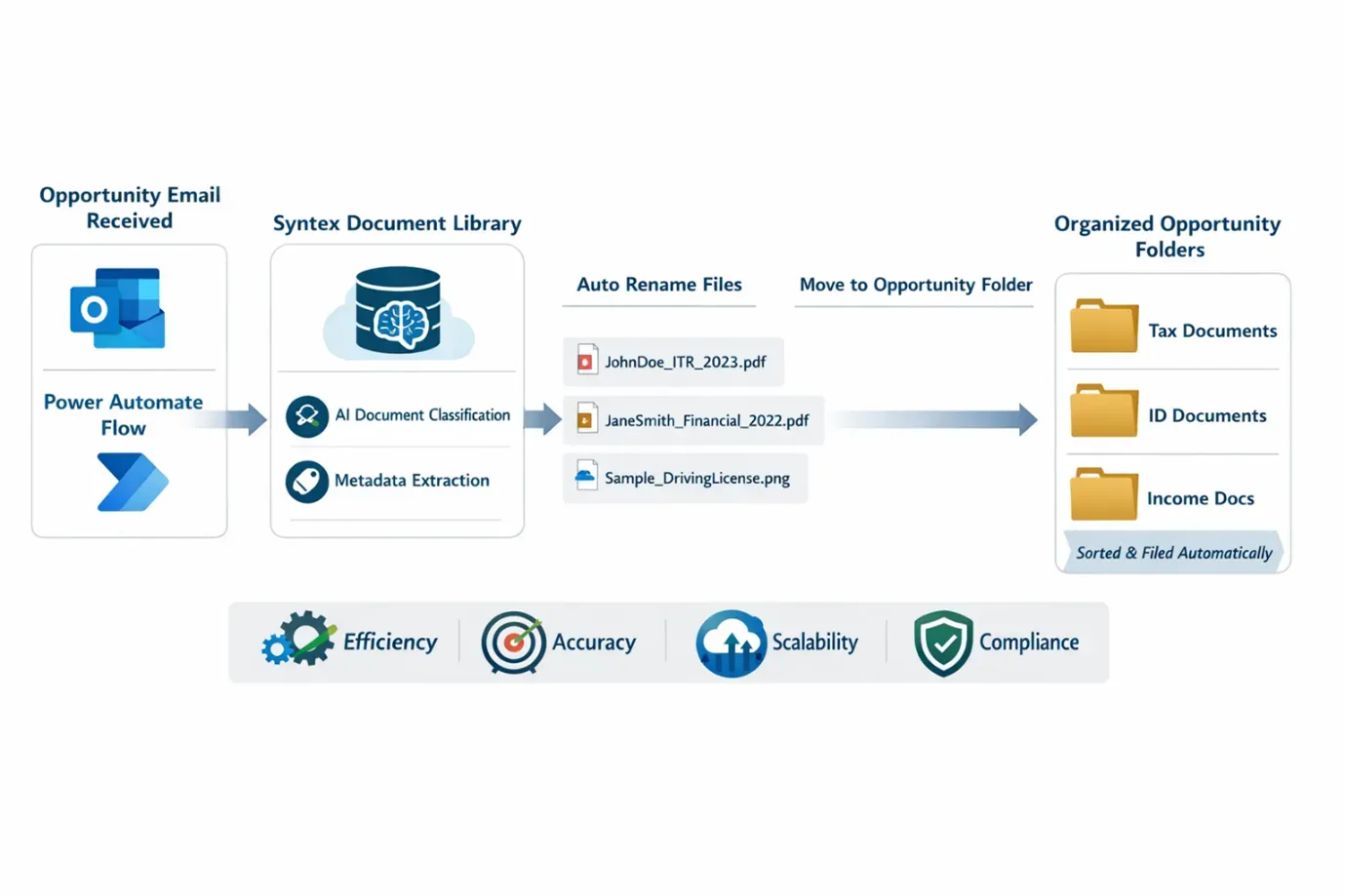
4. How the Solution Works
4.1 Automated Email Trigger
Using the Outlook connector in Power Automate:
- The flow is triggered whenever a new opportunity email is received
- Attachments are automatically extracted
4.2 AI-Powered Document Classification with Syntex
We trained Microsoft Syntex models to identify various document types, including:
- Income Tax Returns
- Financial Statements
- Driving Licenses
- Company Tax Returns
- Council Rates
- Salary Slips
Syntex doesn’t just classify documents—it also extracts key metadata such as:
- 👤 Customer/Person Name
- 📅 Year
- 💰 Income
- 📄 Document Type
4.3 Smart Document Upload to SharePoint
All email attachments are:
- Uploaded to a Syntex-enabled SharePoint document library
- Automatically processed by AI models
4.4 Dynamic File Renaming
Once metadata is extracted:
- Documents are renamed using a standardized naming convention
- Example:
JohnDoe_ITR_2023.pdf
This ensures consistency and easy retrieval.
4.5 Automated Document Organization
Finally:
- Documents are moved into the correct folder structure under each opportunity
- Classification determines the destination folder (e.g., Tax, Identity, Income)
5. Key Benefits Achieved
🚀 Increased Efficiency Manual effort reduced drastically—what once took hours now happens in minutes.
🎯 Improved Accuracy AI-driven classification eliminates human errors in document identification and naming.
📊 Enhanced Searchability Metadata-driven organization makes document retrieval fast and reliable.
🔄 Scalability The system easily handles increasing volumes of client opportunities without additional effort.
🔐 Standardization & Compliance Consistent naming and structured storage improve audit readiness and compliance.
6. Why Microsoft Syntex?
Microsoft Syntex brings AI directly into your content workflows. Unlike traditional OCR tools, it understands documents in context, enabling:
- Intelligent classification
- Metadata extraction
- Seamless integration with Microsoft 365
When combined with Power Automate, it becomes a powerful engine for end-to-end document automation.
Conclusion:
This transformation showcases how organizations can move from manual, error-prone processes to intelligent, automated workflows using Microsoft’s modern tools.
By leveraging Microsoft Syntex and Power Automate, our client not only streamlined their document management process but also unlocked new levels of efficiency, accuracy, and scalability.
